TeamReach - Your Team App
- 3.4
- Rating
- 1.00M
- Installs
- Free
- Price

 Analysis by App-foxy
When a sports group is small enough for everyone to know one another but busy enough for messages to get lost, TeamReach can be a useful middle ground. I tried it as a team-management app rather than treating it like another general social network, and that distinction matters. Its value comes from putting a group’s communication in one place, not from trying to replace every tool a club already uses.
TeamReach is made by TeamReach LLC and is available as a free sports app for everyone. It has reached over a million installs and holds a 4.3 average from around 2.7 thousand ratings, which suggests that the basic idea works for a wide range of teams and clubs. I can see why: a coach, parent, player, or volunteer administrator can use one shared space instead of juggling scattered text messages, email threads, and last-minute announcements.
What using TeamReach feels like in a real team
The first thing I noticed is that the app’s usefulness depends less on technical complexity and more on group discipline. A team can have the app installed and still feel disorganized if nobody agrees where important information belongs. TeamReach gives the group a central place to communicate, but people still need a simple habit: check the team space before asking the same question again.
You May Also Like

 Blood Strike: 2.5 Anniversary
Blood Strike’s Loadouts Turn Every Drop Into a Tactical Gamble
A close look at Blood Strike’s custom loadouts: how fast access to signature weapons reshapes its battle royale rhythm, rewards preparation, and narrows the gap between fights.

 Pandora - Music & Podcasts
Pandora’s Music Is Easy to Start, but Harder to Recover
Pandora’s strength is its low-effort path from a seed to a station. Its weak spot is how much confidence it asks you to place in connection, setup, and quiet recovery.

 8 Ball Pool
 Is Built on Rivalries, Rematches, and Routine
A close look at the rivalries, rematches, shared routines, and unanswered safety questions that turn a quick pool match into a persistent mobile community.

 Samsung Music
’s Quiet Strength Is Playing What You Already Own
Its reach comes less from spectacle than from dependable access to a personal library. That simplicity is both the app’s strongest retention engine and its ceiling.

 AccuWeather: Weather Radar
AccuWeather Review: A Quick, Clear Forecast for Everyday Decisions
For everyday plans, the best forecast is the one you can understand quickly. AccuWeather makes rain timing, radar, and local conditions easy to act on, with a few trade-offs.

 Hill Climb Racing
Why Hill Climb Racing Still Turns Crashes Into One More Run
A tiny car, a bumpy hill and one more upgrade: Hill Climb Racing keeps resurfacing because its simple chaos makes every near-miss feel personal.
More From Our News Desk



Imagine a youth soccer team with a training session after school. A parent needs to know whether players should arrive in match clothing or regular practice gear, while the coach needs to tell everyone that the meeting point has changed. In a normal text thread, some people may miss the update, reply privately, or continue using an old message as their reference. With a dedicated team app, the announcement has a clearer home, and families can return to the same group instead of searching through unrelated conversations.
That sounds ordinary, but it is one of the strongest reasons to use this kind of tool. TeamReach is not trying to entertain me or fill spare time. It is designed around the practical question of how a group keeps everyone informed without making one person repeat every detail individually.
Where new users are most likely to get stuck
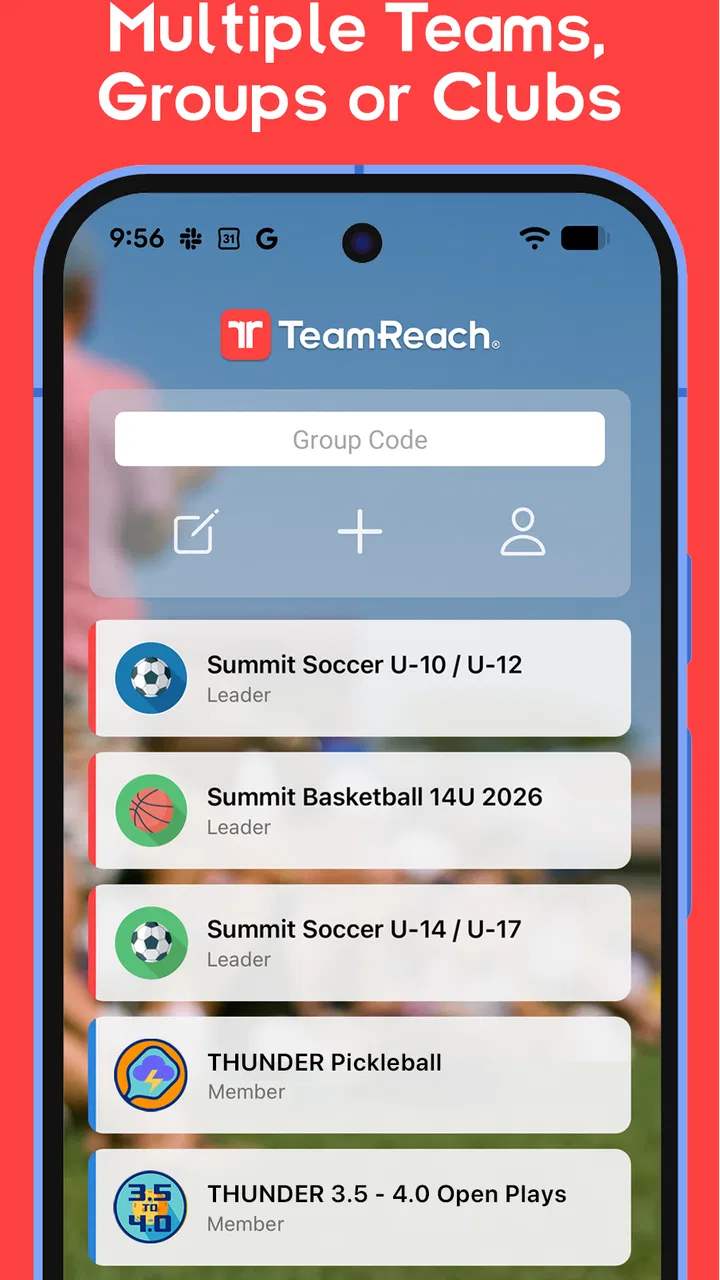
The most common friction is not necessarily a broken function. It is joining the wrong team space, using an outdated invitation, or expecting the app to automatically know which club or squad a person belongs to. A first-time user may install it, open it, and wonder why the relevant group is not immediately obvious. The app becomes much easier once the team’s joining instructions are clear.
For that reason, I would ask the coach or administrator for the exact group details before creating several accounts or trying random searches. If a family has more than one child, it is also worth confirming whether each player should be represented separately or whether the group has its own preferred arrangement. That small decision affects how clearly replies and attendance-related conversations can be understood later.
Another point of confusion is the difference between installing the app and actually being connected to the right team. Installation only puts the tool on the phone. The useful part begins after the person has entered the intended group and can see the team’s communication. If the screen looks empty, I would first check the group connection rather than assume that the app itself is failing.
Notifications can create a second kind of confusion. A user may believe the team has not posted anything when the phone has muted alerts, restricted background activity, or grouped notifications in a way that makes them easy to overlook. I would check the phone’s notification settings and the app’s own alert controls before blaming the team administrator. On a busy match day, missing one announcement can make the whole system feel unreliable even when the message was sent correctly.
A cleaner setup starts with one agreed routine
My advice is to set up the app when you are not already rushing to a practice or game. Join the correct team, confirm that the group name matches what you expect, and make sure notifications behave normally. Then ask the administrator where urgent announcements will appear and whether routine questions should stay in the group conversation. This prevents the app from becoming just another place where information is duplicated.
Administrators should also decide who is responsible for keeping the group understandable. A team space becomes harder to use when old announcements, repeated questions, and unrelated conversations bury the details that families actually need. Even without complicated management rules, a short message explaining the group’s purpose can save time for every new member.
One practical setup tip is to keep the app associated with the phone you check most often. If you move between devices, change phone settings, or rely heavily on a tablet, take a moment to confirm that alerts are appearing where you expect them. This is especially important for parents who share responsibility for transportation. The app cannot solve a communication gap caused by an account or device that nobody is actively checking.
TeamReach is free to download and use as an app, while in-app purchases range from around three dollars to around ten dollars per item. I would not make a buying decision until I understood what the team actually needs and who, if anyone, is expected to pay. For a basic group that only needs organized communication, it makes sense to start with the free experience and avoid assuming that an optional purchase is required for ordinary participation.
Recovering when a message or update seems to have disappeared
When something appears to be missing, I would use a simple recovery order instead of immediately reinstalling the app. First, confirm that the phone has a working internet connection. Next, reopen the relevant team space and check whether the content appears after a fresh load. Then verify that the account is still connected to the intended group and that notifications have not been silenced.
This order matters because reinstalling too early can create more confusion. A person may forget which sign-in details or invitation they used, or they may return to the app without knowing whether the original problem was connectivity, notification settings, or group membership. A calm check of the basics usually gives a clearer answer.
If another team member can see an announcement but you cannot, compare the two situations carefully. Are you both in the same group? Are you looking at the same conversation? Is one phone offline or using a restricted connection? This kind of comparison is more useful than asking only whether “the app is down,” because many apparent outages are actually account, device, or group-specific problems.
For administrators, recovery also means repeating essential information through a second agreed channel when timing matters. I would not rely on one app alone for a last-minute venue change if some members have not completed setup. A short backup message can protect the team while everyone gets connected. That is not a criticism of TeamReach; it is sensible planning for any communication system used by a mixed group of experienced and first-time users.
A useful habit is to make important announcements easy to recognize. Put the key detail near the beginning, include the relevant day or location in plain language, and avoid combining several unrelated instructions in one message. TeamReach can centralize communication, but the quality of the message still determines how quickly people understand it.
When the app is not the actual cause of the problem
It is tempting to blame the app when a player arrives at the wrong place or misses a schedule change. In practice, the cause may be an old message copied into a private chat, a family member who was never added to the group, or a coach who announced the update somewhere else. TeamReach works best when the group treats it as the agreed source for current information.
There is also a human limitation: not every member checks messages at the same pace. A parent may have notifications disabled during work, while a player may not be responsible for monitoring the phone at all. For youth teams, the administrator should be clear about whether information is intended for players, parents, or both. The app can host the communication, but the team still needs a reliable responsibility chain.
Connectivity is another easy culprit. A weak mobile signal, unstable Wi-Fi, battery-saving restrictions, or a phone that has paused background activity can delay what feels like an urgent update. I would test the app on a normal connection before deciding that messages are not arriving. If other apps are also struggling, TeamReach is probably only showing the effect of a wider device or network issue.
The same caution applies to account changes. If a person has switched email addresses, phones, or team roles, the administrator may need to confirm that the group still recognizes the correct account. Creating multiple profiles can make a simple membership problem harder to untangle, so I would check the original account first and keep the team informed while resolving it.
How it compares with texts, email, and larger collaboration tools
Compared with ordinary group texting, TeamReach offers a more focused home for team communication. Text messages are familiar and quick, but they often mix family conversations, unrelated alerts, and separate threads for the same event. A dedicated team space is easier to explain to new members: this is where the team’s messages belong.
Email is better for long explanations, formal documents, and information that people may need to search later. It is also a poor fit for families who rarely check their inbox during a busy sports day. I see TeamReach as more immediate and less formal, while email remains useful for detailed policies or season information that should not be buried in everyday conversation.
Large collaboration platforms can offer broader project-management functions, but they may feel excessive for a local sports group. A club with several committees, documents, schedules, and administrative layers might need a more comprehensive system. A single team that mainly needs dependable communication may prefer TeamReach because it keeps the scope narrower and the learning curve lighter.
The trade-off is that a specialized team app does not automatically become a complete club-management system. If your organization needs advanced registration, accounting, extensive file management, or a full calendar workflow, I would compare other services before making TeamReach the only platform. Its strength is concentrated communication, not replacing every administrative tool.
Who will benefit most, and who should choose something else
I would recommend TeamReach to coaches who are tired of repeating the same updates, parents who need one recognizable place for team news, and volunteer-run clubs that want a straightforward communication routine. It is particularly suitable when the group contains people with different levels of technical confidence, because the purpose is easy to explain: join the team space and check it for current information.
It can also help teams that change membership during a season. New families do not have to search through an old text history to understand where communication happens. The administrator can direct them to the team’s established space and explain the basic expectations. That is a small but meaningful improvement over inheriting a conversation that began months earlier.
I would hesitate to recommend it as the sole solution for a large organization with complicated permissions, formal records, or many separate operational needs. I would also think twice if the team refuses to agree on one communication channel. No app can prevent people from posting critical updates in private messages, social networks, and email at the same time.
Privacy and attention are worth considering too. Some families may not want another source of alerts, and some players may not have direct responsibility for team communication. The administrator should set reasonable expectations rather than assuming that every member is watching the app continuously. A clear routine is more valuable than constant notifications.
Version, availability, and the practical decision
The current version is 9.7.1, and the app supports devices running Android 7.0 or later. That makes it accessible on many older Android phones, although the experience will still depend on the device’s notification behavior, available storage, and connection quality. I would update the app when possible, especially before an important event, but I would also test the team space rather than assuming an update alone fixes every issue.
Its Everyone content rating makes sense for a general team communication tool, but that does not remove the need for sensible group moderation. Coaches and club administrators should still keep messages relevant, avoid sharing unnecessary personal details, and explain who should be contacted when a matter is sensitive or urgent.
After using it with a practical mindset, my view is that TeamReach succeeds when a team needs a clear communication home and is willing to use it consistently. It is less impressive when people expect it to organize a club automatically or replace every other service. The real advantage is not a flashy feature; it is reducing the number of places where a team has to look for the next important update.
I would start with one team, one administrator-led routine, and a quick notification check for every member. If messages remain scattered after that, the problem is probably the group’s habits rather than the app. If the team wants a focused, free starting point for sports communication, TeamReach is worth trying. If it needs deep administration, complex records, or a complete club operating system, a broader platform may be the better choice.
For my final recommendation, I would suggest it to a friend running a local team, especially one currently relying on several overlapping chats. I would tell them to make the communication rules clear, verify every new member’s group connection, and keep a backup method for urgent changes. Used that way, TeamReach is a practical sports app with a sensible purpose, a few setup traps, and enough flexibility to make everyday team coordination noticeably calmer.
FAQs for TeamReach - Your Team App
01What is TeamReach and how does it work?
TeamReach is a communication app designed for sports teams, clubs, and groups. It simplifies team management by allowing users to create groups, schedule events, and communicate seamlessly. Once you create a team, you can invite members, set up events, and send messages, ensuring everyone stays updated.
02Is TeamReach available for both Android and iOS devices?
Yes, TeamReach is available for download on both Android and iOS platforms. You can find it on Google Play Store for Android devices and the Apple App Store for iOS devices. The app offers a consistent user experience across both platforms, making it easy for all team members to stay connected.
03Does TeamReach offer any features for managing team schedules?
Absolutely! TeamReach provides robust scheduling features, allowing you to create and manage events, practices, and games. You can send out invitations, track RSVPs, and even set reminders for upcoming events. This ensures everyone is on the same page and no one misses important team activities.
04Is there a cost associated with using TeamReach?
TeamReach is free to download and use. It offers a variety of features at no cost, making it accessible for teams of all sizes. However, there might be optional in-app purchases or premium features available for users who wish to enhance their experience with additional functionalities.
05How secure is the communication within TeamReach?
TeamReach prioritizes user privacy and security. The app uses secure encryption protocols to protect all communications and data shared within the platform. Additionally, only team members invited and approved by the admin can access the team’s information, ensuring that all interactions are safe and confidential.
Pros
- Easy team communication and coordination.
- User-friendly interface for all ages.
- Event scheduling with reminders.
- Instant notifications for updates.
- Customizable team settings and roles.
Cons
- Limited free features available.
- Occasional app performance issues.
- Ads can be intrusive for free users.
- No offline mode for event updates.
- Some features require in-app purchases.

TeamReach - Your Team App
Gallery